Git
学习教程:
极简小白入门:git 简明指南
图形化教程:Learn Git Branching
创建新仓库
执行git init在当前文件夹创建新的git仓库
工作流
本地仓库由git维护的三棵“树”组成:
- 工作目录:持有实际文件
- 暂存区:缓存区域,临时保存改动
- HEAD:指向后一次提交的结果
使用git add <filename>将指定文件提交到暂存区,支持通配符*
使用git commit创建新的记录,属于master
分支
创建仓库的时候,master 是默认的分支。在其他分支上进行开发,完成后再将它们合并到主分支上
创建分支
git branch <branchname>
- 切换所在分支:
- 切换是为了提交修改时不会提交到主分支上
git checkout <branchname>
- 创建同时切换到新分支
git checkout -b <branchname>
合并分支
- 使用
git merge
git merge <branch>
将当前分支合并到branch分支上,此时两个分支拥有相同的修改记录
实现如下的效果:
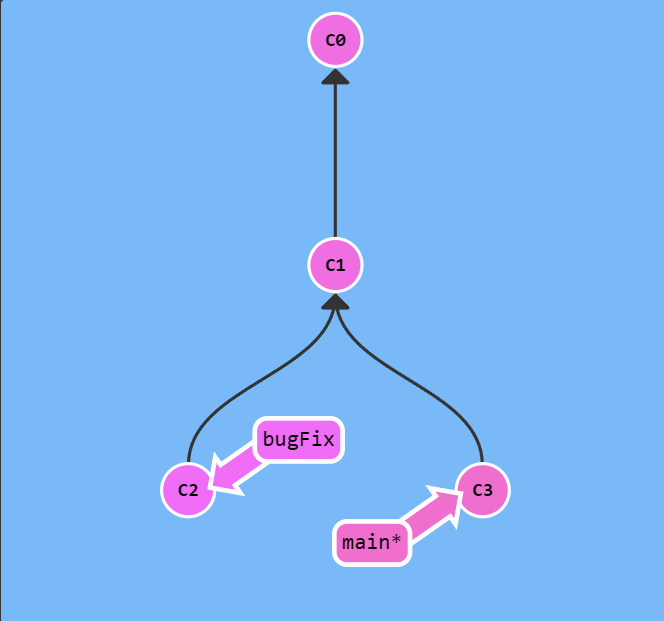
执行git merge bugFix后

- 使用
git rebase
git rebase <branch>
将branch作为当前分支的parent,branch和当前分支原来是两个并行的分支
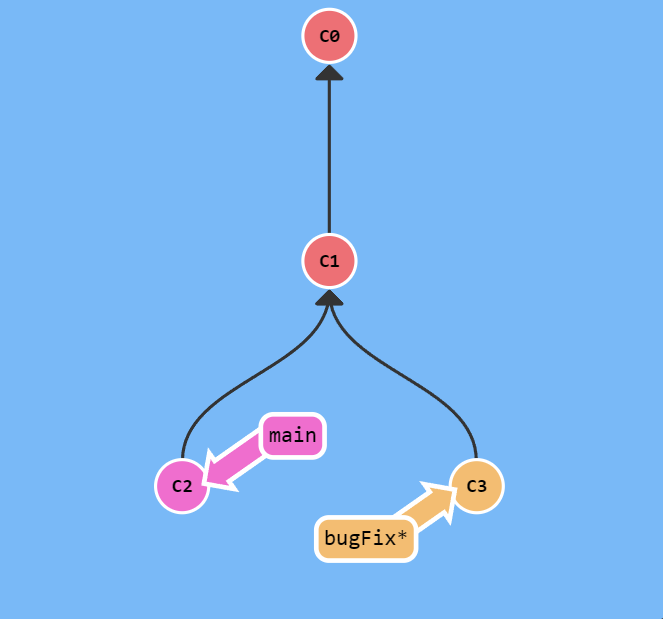
执行git rebase main后:

分支树操作
使用HEAD在树上移动
HEAD 总是指向当前分支上最近一次提交记录
如执行git checkout C1就会指向C1提交记录(实际开发中每次提交都会附带哈希值以便索引)
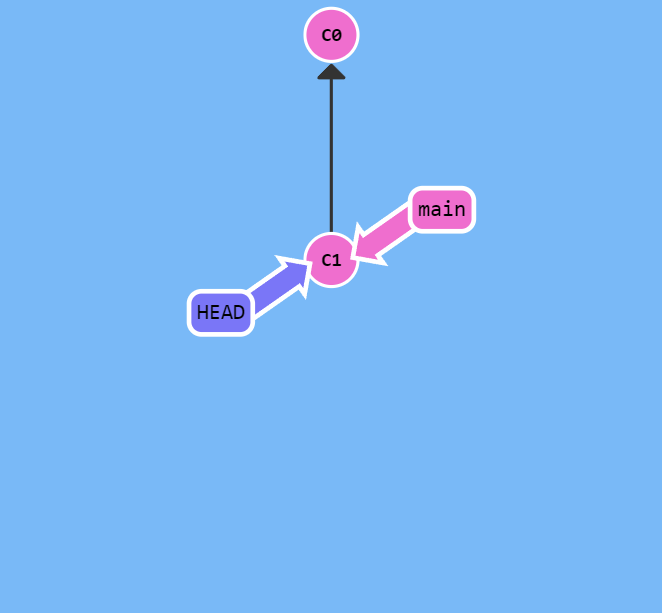
实际上上文中的指向分支也是利用HEAD,指向提交记录实际上是将HEAD从分支中分离出来,便于定位和在分支树上移动
相对引用
由于实际上哈希值很长,git提供了相对引用来显示的计算移动
移动HEAD
^使得HEAD向上移动一个,即指向parent~<num>可以指定移动距离
显然也可以顺便达到分离HEAD的目的
强制移动分支
使用语句:
git branch -f <branchName> <position>
将指定的branch移动到position的位置
position可以是哈希或者相对引用
撤销提交
注意两个撤销的position逻辑不一致
本地撤销
使用命令
git reset <position>
将本地的提交记录重设为position的提交记录,只在本地可见和生效
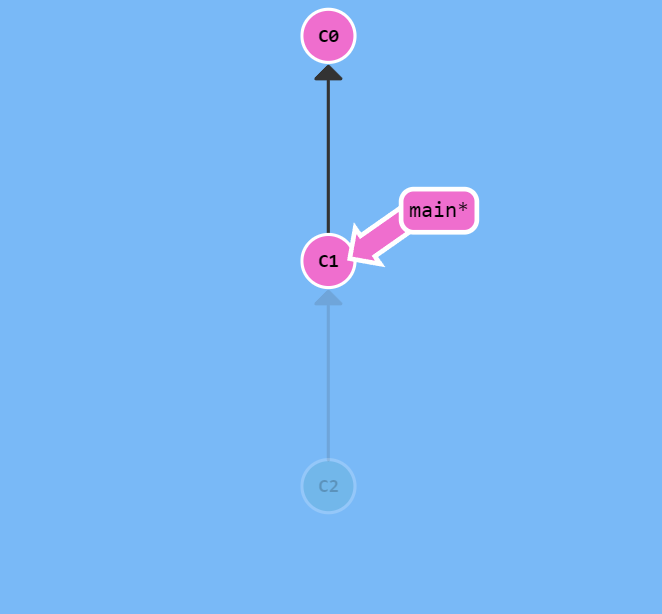
远端撤销
使用命令
git revert <position>
将position位置的记录撤销,该操作远端仓库所有人可见(实际上是提交了一条新的记录,不包含当前位置的记录)
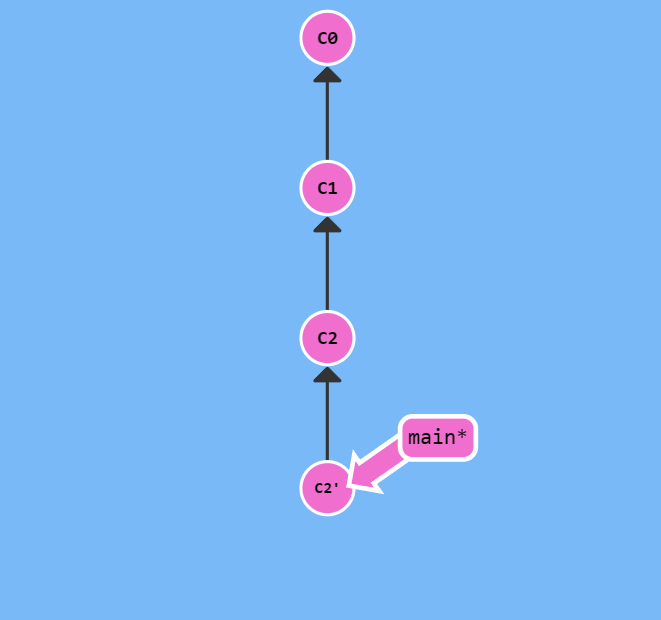
撤销操作
运行命令:
git reflog
可以查看所有的操作
2d29ec06e (HEAD -> M3S13, ups/240130-ctc-temp, 240130-ctc-temp) HEAD@{0}: checkout: moving from 240130-ctc-temp to M3S13
2d29ec06e (HEAD -> M3S13, ups/240130-ctc-temp, 240130-ctc-temp) HEAD@{1}: checkout: moving from M3S13 to 240130-ctc-temp
2d29ec06e (HEAD -> M3S13, ups/240130-ctc-temp, 240130-ctc-temp) HEAD@{2}: checkout: moving from 3158d209a7d13e09afc090e780c18c1555f42f95 to M3S13
3158d209a (origin/main, origin/HEAD, main) HEAD@{3}: checkout: moving from M3S13 to origin
2d29ec06e (HEAD -> M3S13, ups/240130-ctc-temp, 240130-ctc-temp) HEAD@{4}: commit: bugFix
e7af7d791 (origin/M3S13) HEAD@{5}: commit: 5 new api,with some bug to be fixed
72569dba6 (origin/240130-ctc-temp) HEAD@{6}: commit: add User api
058bf8903 HEAD@{7}: commit: add getUserByIdTest
a3b9a845f HEAD@{8}: checkout: moving from a3b9a845f141b4bd62e6d53047e14401c2a2f373 to M3S13
a3b9a845f HEAD@{9}: checkout: moving from main to ups/M3S13
3158d209a (origin/main, origin/HEAD, main) HEAD@{10}: clone: from http://47.103.142.157:2022/CuiTiancheng/simt_back.git
此时运行:
git reset --hard HEAD@{n}
即可回退到指定的历史变更
如:
git reset --hard a3b9a845f
就可以回到
checkout: moving from a3b9a845f141b4bd62e6d53047e14401c2a2f373 to M3S13
状态
查看不同
git diff <目标分支>
可以在命令行查看不同
查看本地分支
git branch
即可查看分支状态
*标记的就是当前所在的分支
git branch -a
即可查看所有分支
远程仓库
// 添加远程仓库
git remote add ups <远端仓库url>
// 删除指定远程仓库
git remote rm <仓库名>
远端仓库url在clone时即可查看
配置代理
删除分支
// 删除本地分支
git branch -d localBranchName

// 删除远程分支
git push origin --delete remoteBranchName